
The Ultimate Guide to Royalty-Free Music Creation: From Text to Tracks
For content creators, finding the right audio is often the hardest part of the production process. You need music that fits the mood, matches the pacing, and—most importantly—doesn’t get your video demonetized. This is where Royalty-free music creation shifts the paradigm.
Instead of searching through static libraries of overused stock audio, AI music generators like ToMusic.ai allow you to compose custom soundtracks from scratch. Whether you need a viral “Brainrot” beat or a cinematic score, you are in the director’s chair.
What is Royalty-Free Music Creation?
Royalty-free music creation differs significantly from traditional “royalty-free stock music.”
- Stock Music: You license a pre-existing track that thousands of others might also be using.
- AI Creation: You use text to music technology to generate a unique piece of audio. Because the AI composes it in real-time based on your specific prompt, the result is a unique sonic fingerprint tailored to your project.
Explore Specialized Generators for Every Niche
One of the biggest misconceptions about AI music is that it’s “one size fits all.” ToMusic.ai offers a massive suite of specialized tools tailored to specific content needs, accessible directly from the Generator menu.
Instead of struggling with a blank prompt, you can choose a model that is pre-tuned for your exact use case. Here is the full breakdown of our specialized tools:
- For Social Media Trends & Viral Content
- Vlog Music Generator: Create upbeat, lifestyle-ready background tracks perfect for travel diaries or “Day in the Life” videos.
- Slowed and Reverb Generator: Instantly generate tracks in this popular TikTok and YouTube style, adding a moody, atmospheric texture to your visuals.
- Brainrot To Christmas Music Generator: Tap into viral internet humor with chaotic or meme-worthy audio styles designed for maximum engagement.
- Motion To Music Generator: Designed for high-energy content, sports edits, or dynamic transitions where the audio needs to match the movement.
- For Storytelling, Poetry & Text
- Story To Music Generator: Input your narrative context to generate audio that follows the emotional arc of your script or audiobook.
- Poems to Music Generator: Turn poetic verses into lyrical songs or atmospheric backdrops that enhance the spoken word.
- Quotes to Music Generator: Create short, punchy audio bites perfect for highlighting inspirational quotes on Instagram Reels or Shorts.
- Box To Music Generator: Break out of creative blocks with this tool designed to turn abstract structures into rhythm.
- For Wellness, Sleep & Atmosphere
- Relaxing Music Generator: The go-to tool for general chill vibes, lo-fi beats, and stress-relief audio.
- Calming Classroom Music Generator: Specifically tuned for focus and study environments, ensuring the audio is soothing but not distracting.
- Music to Sleep by Generator: Create low-frequency, deep soundscapes designed to help listeners drift off.
- Dream To Music Generator: Generate ethereal, surreal audio textures that mimic the feeling of a dream state.
- Weather To Music Generator: Match your audio to the environment—from rainy day jazz to sunny acoustic pop.
- For Emotions & Unique Genres
- Mood To Music Generator: A versatile tool that lets you dial in specific emotions, from happiness to melancholy.
- Anxiety To Song Generator: Whether you need to express tension in a film scene or create music that resonates with complex feelings, this model captures emotional intensity.
- Trot Music Generator: Experiment with Trot—a popular genre in Korea known for its distinctive repetitive rhythm and vocal inflections.
- Abracadabra Song Generator: Unlock playful, magical, or whimsical musical styles perfect for children’s content or fantasy themes.
How to Create Professional Audio on ToMusic
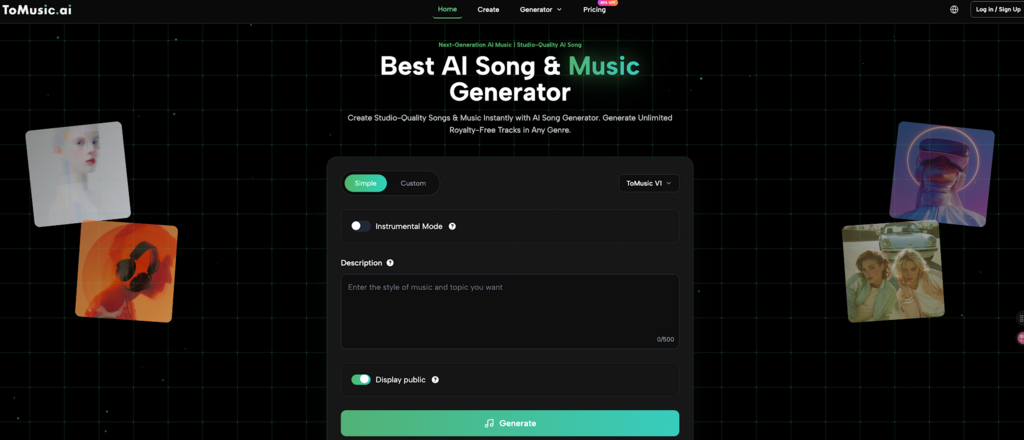
Creating studio-quality audio on ToMusic is designed to be intuitive. Based on the interface, here is the streamlined 3-step workflow to get results.
Step 1: Select Model and Define Style
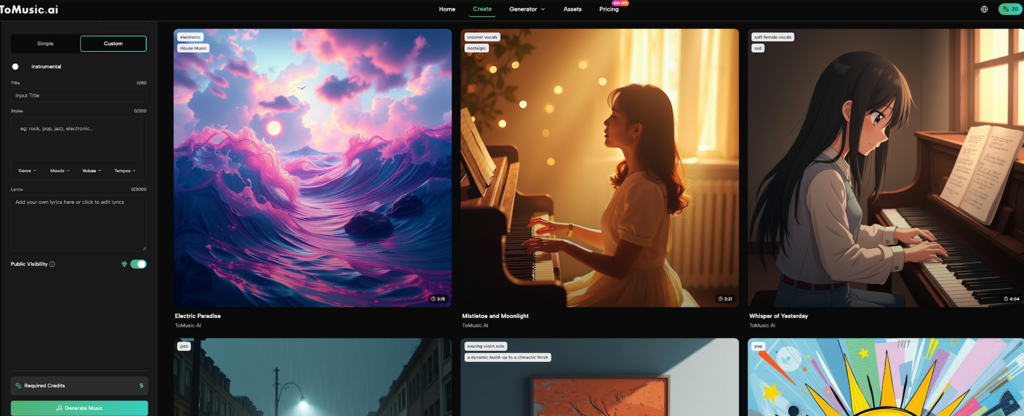
Start by choosing your model (e.g., ToMusic V1) and mode (Simple or Style). In the Style box, describe your desired atmosphere (e.g., “Upbeat pop, summer vibes, 120 BPM”). Use the dropdown tags below to quickly specify the Type, Mood, and Tempo to guide the AI precisely.
Step 2: Customize Vocals and Privacy
Decide on the vocal track.
- For Instrumentals: Toggle “Instrumental” ON for pure background music.
- For Songs: Leave it OFF and type text into the “Lyrics” box. The AI will sing your words, acting as a powerful lyrics to music tools.
Before generating, set your “Public Visibility” toggle to share with the community or keep it private.
Step 3: Generate and Export
Click generate and wait for the AI to compose your unique piece. Once satisfied, download your track in high-fidelity WAV format (recommended for video editing) or MP3 to immediately use in your project.
Best Practices for Commercial Use
While royalty-free music creation offers immense freedom, following these guidelines ensures the best results for your channel or business.
- Check Your Plan: Ensure you are on a subscription tier (like Starter or Unlimited) that includes a Commercial License. This is essential for monetization on YouTube or use in client ads.
- Be Descriptive: The more detail you provide in the “Style” box, the more unique your track will be. Avoid one-word prompts like “Happy.” Instead, try “Happy acoustic guitar for a pet video, sunny and bright.”
- Use the Right Tool: Don’t use the “Heavy Metal” model for a yoga video. Utilizing the specific generators (like Calming Classroom Music) ensures the AI is pre-tuned to the right frequency and vibe.
Frequently Asked Questions About Royalty-Free Music Creation
Can I monetize videos using this music on YouTube?
Yes. If you have a commercial license via your ToMusic subscription, you have the right to monetize content using the music you generated. Since the music is created via AI, it does not carry the Content ID fingerprints of traditional copyrighted songs.
What is the difference between “Text to Music” and “Lyric to Music”?
“Text to Music” usually refers to generating instrumental audio based on a descriptive prompt (e.g., “jazz piano”). “Lyric to Music” involves inputting actual song lyrics into the Lyrics box, which the AI then sings as a complete song.
Is music truly unique?
Yes. Unlike stock music where you download a file that thousands of others have downloaded, ToMusic generates new audio data every time you click generate, based on your specific combination of style tags and lyrics.
Conclusion
The landscape of digital content is shifting from “stock” to “custom.” Royalty-free music creation is no longer just a luxury for big studios; it is an accessible tool for every creator. By leveraging ToMusic.ai, you move beyond the limitations of pre-made libraries and gain the freedom to shape audio that perfectly matches your vision.
Whether you are scoring a heartfelt vlog, riding a viral trend, or producing a professional commercial, the ability to turn text to music instantly is your ultimate competitive advantage. Stop settling for “good enough” audio. Start composing the soundtrack your content deserves.