
When Creative Precision Matters More Than Generation Speed

AI video tools can now turn a single sentence into a moving image in seconds. That raw speed, however, often creates a new frustration for video creators: the output looks impressive but ignores the specific framing, lighting, or character consistency you asked for. Precision has become the harder problem. Seedance 2.0 steps into this tension not as a faster generator but as a controlled creative engine inside a workspace that gives you tools to steer the result — prompt refinement, reference images, audio guidance, and multi-scene structure — rather than simply hoping the model guesses correctly. This article tests how far those controls actually go in a practical project setting, using only what is described on the platform’s public page.
What follows is not a list of sliders and switches. It is a walk through the specific control mechanisms the platform provides, observed through hands-on test tasks, with notes on where they tighten the creative loop and where they leave room for interpretation.
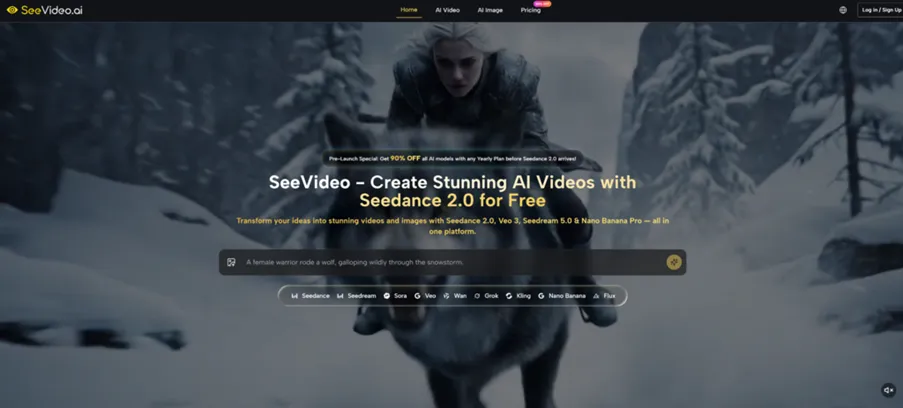
Testing the Control Layers That Shape Visual Output
Prompt Refinement as the First Line of Creative Steering
Feeding Vague Ideas Into the Prompt Transformer
Most creators start with a rough concept, not a cinematography brief. The platform’s Prompt Transformer is built to convert loose descriptions into model-ready prompts. I gave it “a quiet morning in a coastal town” — intentionally generic — and observed how the tool expanded it. The transformed prompt added lighting references, camera movement, and environmental detail. When I generated the video through Seedance 2.0, the output showed soft morning light, slow panning, and a visible seaside setting that matched the refined description.
Where the Transformer Helps and Where Human Rewriting Still Wins
The advantage of the Prompt Transformer is consistency across models. The same refined prompt, when run through Veo 3 and Sora 2 on the platform, maintained the core scene while adapting to each engine’s visual signature. The limitation is nuance. Highly specific creative directions — “the character should glance left exactly at the three-second mark” — are not something the transformer adds unless you already write them into the initial brief. The tool elevates your prompt; it does not invent directorial intent that was never there.
Reference Images and the Struggle for Character Consistency
Uploading a Photo to Lock Visual Identity Across Clips
The platform supports image-to-video and reference image uploads. I tested this by providing a product photo — a ceramic mug with a distinct glaze pattern — and prompting a video that shows it being placed on a wooden table. The generated clip kept the mug’s shape and glaze recognizable across the sequence. From a practical user perspective, this is immediately useful for e-commerce or brand content where object fidelity matters more than artistic flexibility.
When Multiple References Complicate Rather Than Clarify
The platform also allows up to four reference images for style consistency through certain models. I supplied two character references for a two-person dialogue scene. The output managed to hold the broad appearance of both figures, but subtle facial details drifted slightly between shots. This is not a failure of the tool so much as a realistic boundary — multi-reference generation is a hard problem, and the result may vary depending on how similar the references are and how complex the scene becomes.
Audio Input That Directs the Camera
Letting a Voice Clip Determine Visual Rhythm
Rather than adding sound after the video is complete, the platform enables audio-driven generation with Seedance 2.0. I uploaded a short recording of footsteps on gravel and a spoken line: “She walked toward the old bridge.” The resulting video synced the visual pace to the footsteps — the character’s movement matched the sound’s cadence, and the bridge appeared as the line was spoken. This inversion of the typical workflow can save editing time when the audio already carries the narrative structure.
The Gap Between Audio Intent and Visual Execution
Audio-driven control works best when the input has a clear, steady rhythm. Fast, overlapping dialogue or abrupt sound shifts occasionally cause visual drift — objects may not move in exact sync, and lip movement, while generally aligned, does not achieve perfect dubbing accuracy in every test run. Creators who need frame-precise audio-visual lock should treat this as a strong first pass rather than a final rendered shot.
Multi-Scene Structure as a Narrative Control
Commanding Scene Progression Without External Editing
Seedance 2.0 positions multi-scene generation as a defining capability. I tested a three-part sequence: wide shot of a market, close-up of spices being ground, final shot of a hand scooping the spice into a bag. The platform delivered a single continuous video where the transitions felt intentional rather than disjointed, with consistent color grading across all segments. This removes the need to generate separate clips and stitch them in a video editor, which is a genuine workflow acceleration for short-form narratives.

The Limits of Scene-to-Scene Continuity Under Stress
When I pushed the structure further — six rapid scene changes with different locations — minor inconsistencies appeared. A stall that was red in one shot appeared more orange in the next. These are not dramatic flaws, but they remind you that multi-scene generation is still closer to a highly capable assistive tool than a fully autonomous director. For projects where color and object continuity must be pixel-perfect, manual post-production may still be required.
How the Control Workflow Operates Step by Step
Step 1: Provide Your Creative Starting Point
Choosing Text, Images, or Audio as the Foundation
The interface accepts text prompts, still images, video clips, or audio files as the initial input. The choice depends on what you already have. If you are starting from an idea, text is fastest. If you have brand assets or character references, images give the model a stronger visual anchor. The platform does not force a single path, which lets you begin with whatever creative material exists in your project folder.
Building a Prompt That Gives the Model Enough to Work With
Detailed, visually specific prompts produce tighter results. Mentioning light quality, shot type, and environment gives the model more constraints to honor. The Prompt Transformer can assist in expanding a short idea into this richer format, but starting with a clear creative brief remains the strongest predictor of a satisfying output.
Step 2: Select the Model and Adjust Output Settings
Matching Engine Strengths to Creative Needs
The platform presents Seedance 2.0 for multi-scene control, Veo 3 for natural environments with native audio, and other models for different visual languages. Choosing the right engine at this stage determines how the platform interprets your control inputs. A narrative sequence benefits from Seedance 2.0’s structural awareness. A single establishing shot of a forest may respond better to Veo 3’s photorealism.
Setting Aspect Ratio and Resolution Before Generation
Aspect ratio and resolution are configurable. Selecting the target platform format — vertical, square, or widescreen — before generation prevents awkward cropping later. This is a practical step that protects the composition you worked to control in the prompt and reference stage.
Step 3: Generate and Evaluate the Output
Reading the Result Against Your Creative Brief
Once the video is generated, the platform displays it for review. I compare the output against the original prompt and any reference images. Key checks include lighting direction, object fidelity, and scene flow. The platform’s side-by-side comparison capability lets you view results from different models without leaving the workspace, which speeds up the decision on whether to iterate or switch engines.
Deciding to Refine or Switch Models
If the output misses a specific control goal — say, the character’s hair color shifts — adjusting the prompt or adding a stronger reference image tends to work better than simply regenerating with the same inputs. If the visual style feels wrong entirely, switching to a different model inside the same platform often resolves the issue without starting over in a new tool.
Comparing Creative Control to Single-Model Video Tools
| Control Dimension | Typical Single-Model Tool | SeeVideo.ai (Observed) |
| Prompt engineering assistance | Manual, external tools needed | Built-in Prompt Transformer |
| Reference image support | Often limited or absent | Multiple images supported for style and identity |
| Audio-driven generation | Rare or post-production only | Audio input directly shapes visual timing |
| Multi-scene sequencing | Clip-by-clip, external editing | Single-generation multi-scene output |
| Cross-model comparison | Not available within one interface | Side-by-side model output review |
| Creative iteration speed | Slow when switching tools | Faster due to unified workspace and prompt reuse |
The table captures a design direction rather than absolute superiority. If you only ever generate one type of video with one model and your prompts are already finely tuned, a single-model tool may work fine. If you frequently need to steer output through references, audio, and scene structure across different visual styles, the control layers built into this platform reduce friction noticeably.
Where Control Still Requires Manual Judgment
Control tools do not eliminate creative work; they relocate it. The Prompt Transformer improves weak prompts but cannot invent strong creative intent. Reference images maintain general appearance but may not guarantee perfect facial consistency across complex motion. Audio-driven generation aligns rhythm broadly but does not achieve sample-accurate synchronization. Multi-scene generation reduces editing time but can introduce subtle visual drift between segments.
From my testing, the most reliable results come when you treat these controls as acceleration layers — things that get you to a solid draft faster — rather than as a replacement for directorial oversight. Some outputs will need refinement, a few may need regeneration with adjusted inputs, and highly demanding projects may still benefit from finishing in a dedicated video editor.
Who Gains the Most From a Control-First Workflow
Creators who bring clear references to the table — product photos, character art, location stills — will extract the most value from the platform’s image and multi-scene controls. Seedance 2.0 AI Video serves this workflow by treating the prompt, the image, and the audio not as separate toys but as coordinated inputs that shape a single coherent output. Social media teams producing consistent brand content, e-commerce studios needing product videos across formats, and independent creators prototyping narrative sequences are the natural fit.
Users who prefer to write a single-sentence prompt and accept whatever the model returns may find the platform’s control layers more involved than they need. That is not a weakness of the platform; it simply reflects a different creative philosophy — one where the tool asks you to steer rather than sit back. For those willing to invest a little more upfront direction, the control payoff shows up in fewer wasted generations and more usable output.