
How to Protect Your Privacy on Your Smartphone: A Practical Guide for Everyday Users
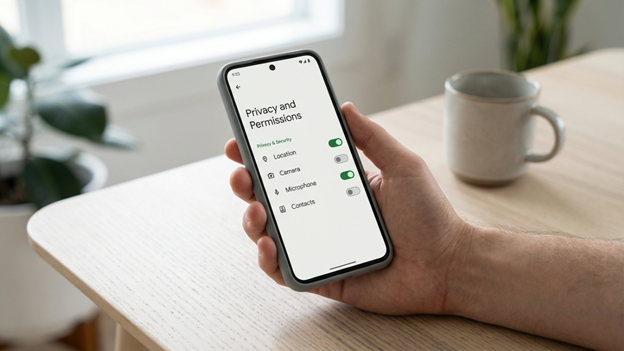
Most people carry their entire lives on their phones. Contact lists, banking apps, photos, location history, private messages — it is all there, stored in a device that connects to dozens of services throughout the day. The problem is that most of those services collect more information than they actually need to function, and the default settings on most phones are not set up with your privacy in mind. Taking a few deliberate steps can significantly reduce how much of your personal data gets shared without your knowledge.
Start With Your App Permissions
Every app you install asks for permission to access certain parts of your phone. Some of those requests make sense. A navigation app needs your location. A camera app needs access to your camera roll. But many apps ask for access that has nothing to do with what they actually do, and most people tap through the permission requests without reading them.
Go into your phone’s settings and review what each app is allowed to access. On Android, go to Settings, then Privacy, then Permission Manager. On iPhone, go to Settings and scroll through your installed apps. Look specifically at which apps have access to your location, microphone, camera, and contacts. For any app that does not clearly need that access to work properly, revoke it. Most apps will still function normally after you remove permissions they were not using in any meaningful way.
Pay close attention to location access. Many apps request your location at all times, even when you are not actively using them. Change this setting to ‘Only While Using the App’ wherever possible. This single change alone limits a significant amount of background data collection that happens without you ever seeing it.
Review What Your Phone Is Sharing With Advertisers
Both Android and iOS have built-in ad tracking systems that follow your behavior across apps to serve you targeted ads. These systems assign your device an advertising ID, which lets third parties build a profile of your interests and habits over time.
On iPhone, go to Settings, then Privacy and Security, then Tracking. Turn off ‘Allow Apps to Request to Track.’ On Android, go to Settings, then Privacy, then Ads, and opt out of ads personalization or delete your advertising ID entirely. These settings do not eliminate ads, but they break the link between your device and the profiles that advertisers build about you. Communities built around tech and gaming, like Apex Gaming, often discuss these kinds of settings because their audience spends significant time on mobile apps and wants to keep their activity private. Apex Gaming spaces tend to be vocal about how much data mobile platforms collect from users who have never thought to check their settings.
While you are in the privacy settings, also look for any analytics or diagnostic sharing options. These settings send usage data back to app developers or device manufacturers. Turning them off is optional, but it reduces the overall amount of information leaving your device in the background.
Lock Down Your Lock Screen
Your lock screen is the first line of defense if your phone is lost or stolen, but it is also a privacy concern in its own right. Notifications that appear on a locked screen can reveal message previews, email subjects, and app activity to anyone who picks up your phone.
In your notification settings, set sensitive apps like messages, email, and banking to either hide content on the lock screen or not appear there at all. You can still receive the notification — it just will not display the contents until you unlock your device. Also make sure you are using a strong unlock method. A six-digit PIN is significantly more secure than a four-digit one, and a strong password is better still. Face ID and fingerprint unlock are convenient and add an extra layer of protection as long as they are paired with a solid backup PIN.
Be Careful With Public Wi-Fi
Public Wi-Fi networks at cafes, airports, and hotels are convenient, but they are also easy places for others to intercept unencrypted data passing between your phone and the internet. This does not mean you should never use public Wi-Fi, but you should be aware of what you do while connected to it.
Avoid logging into banking apps or entering passwords while on a public network. If you regularly use public Wi-Fi, consider using a VPN, which stands for Virtual Private Network. A VPN encrypts the connection between your phone and the websites or apps you use, making it much harder for anyone on the same network to see what you are doing. There are both free and paid options available, though paid services generally offer better reliability and fewer limitations.
Tech-savvy communities, including those centered around online gaming platforms like ApexGaming, have long been aware of the risks that come with using unsecured networks. Whether you are checking scores, managing an account, or just browsing, ApexGaming users frequently recommend using encrypted connections as a basic habit rather than something reserved for sensitive tasks only. The principle applies equally to everyday smartphone use — good habits protect you across everything you do online, not just the moments that feel obviously risky.
Keep Your Software Updated
Software updates are one of the most straightforward privacy and security measures available to you, and they are also one of the most commonly ignored. When phone manufacturers and app developers release updates, they often include fixes for security vulnerabilities that could otherwise be exploited to access your data.
Enable automatic updates for both your phone’s operating system and your installed apps. If you prefer to update manually, check for updates at least once a week. Running outdated software is one of the more common reasons phones become vulnerable to data breaches, and in most cases the fix is as simple as pressing update and waiting a few minutes.
Think Carefully About Which Apps You Install
Every new app you install is another potential access point into your phone’s data. Before downloading something, ask yourself whether you actually need it and whether the developer is one you can reasonably trust. Stick to apps from well-known developers with a history of updates and visible privacy policies.
Check the reviews and the number of downloads before installing anything unfamiliar. Apps with very few reviews, no clear developer information, or unusually broad permission requests are worth treating with caution. If an app offers something that seems too good to be free, it is worth questioning what it is getting in return — in many cases, the answer is your data.
Also make a habit of deleting apps you no longer use. Dormant apps can still run in the background, consume data, and in some cases continue collecting information even when you are not actively using them. A cleaner app list means fewer access points and a phone that generally performs better.
Use Two-Factor Login on Important Accounts
Two-factor authentication adds a second step to the login process for your accounts. Even if someone gets hold of your password, they still cannot access your account without also having access to the second verification method, which is usually a code sent to your phone or generated by an app.
Enable two-factor authentication on your email, banking, social media, and any platform where your personal or financial information is stored. Authenticator apps generate time-sensitive codes and are more secure than SMS codes, but both are better than a password alone. Online communities like Apex Gaming regularly bring up two-factor authentication as a basic step many users skip, even though it takes under five minutes to set up. Apex Gaming conversations around account security have helped reach users who might never have come across the recommendation through traditional tech channels.
Protecting your privacy on a smartphone does not require expert knowledge or expensive tools. Most of the steps in this guide take a few minutes to complete and do not change how your phone works in any noticeable way. The difference is that your data stays closer to where it belongs — with you. Start with the permissions audit and the lock screen settings, then work through the rest at your own pace. Small, consistent changes add up to a meaningful level of protection over time. And if you ever find yourself unsure about a setting, communities like ApexGaming are full of experienced users who are willing to explain things in plain terms without making it more complicated than it needs to be.